Types of Network Topology in Computer Network
Network topology refers to the arrangement of computers, networking devices, and communication links in a computer network. It determines how devices are interconnected and how data travels between them. Different network topologies are designed to meet different communication requirements, making them suitable for various environments such as homes, offices, educational institutions, and large enterprises.
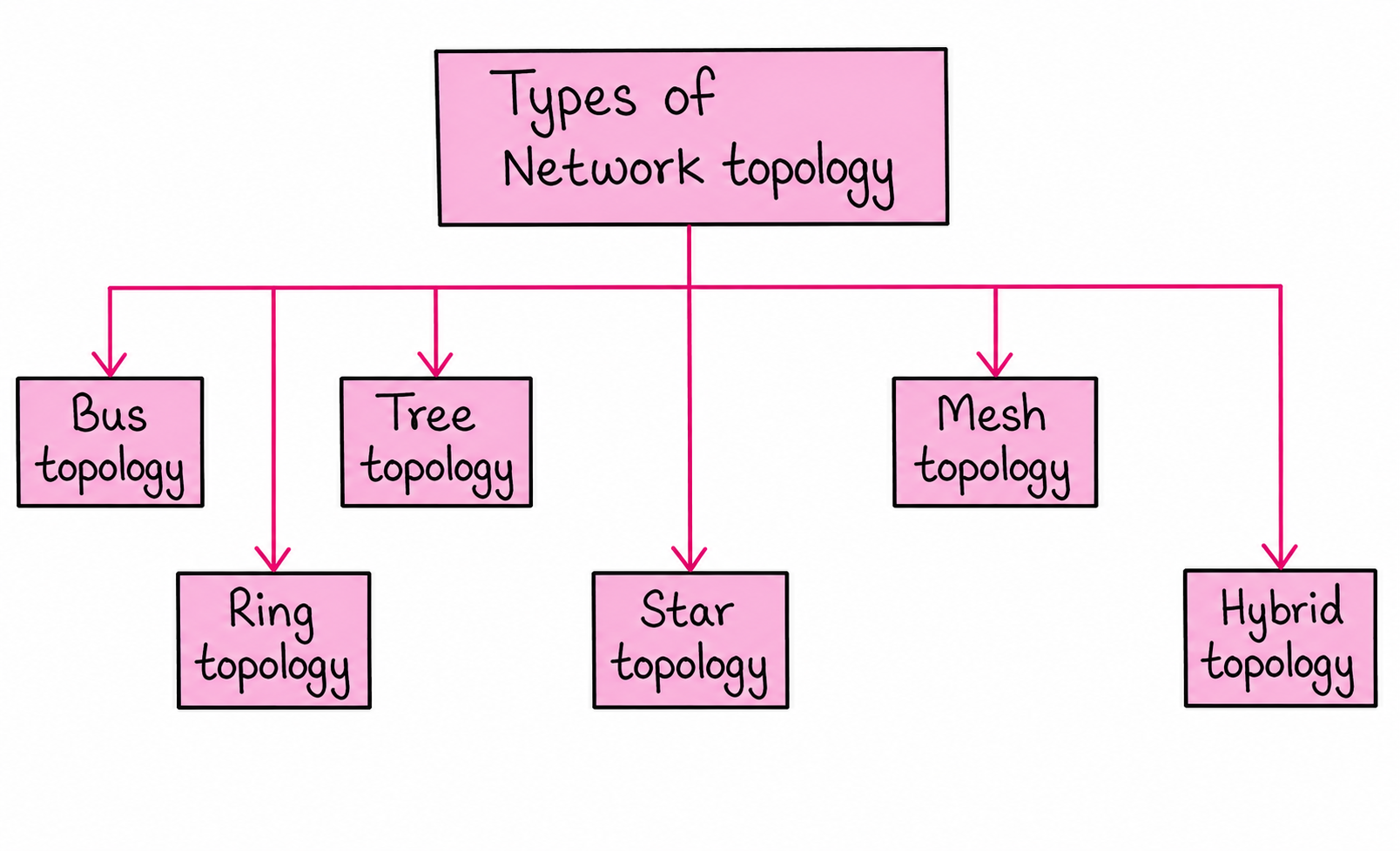
The major network topologies are Bus Topology, Star Topology, Ring Topology, Mesh Topology, Tree Topology, and Hybrid Topology. Each topology has its own advantages, disadvantages, and applications.
1. Bus Topology
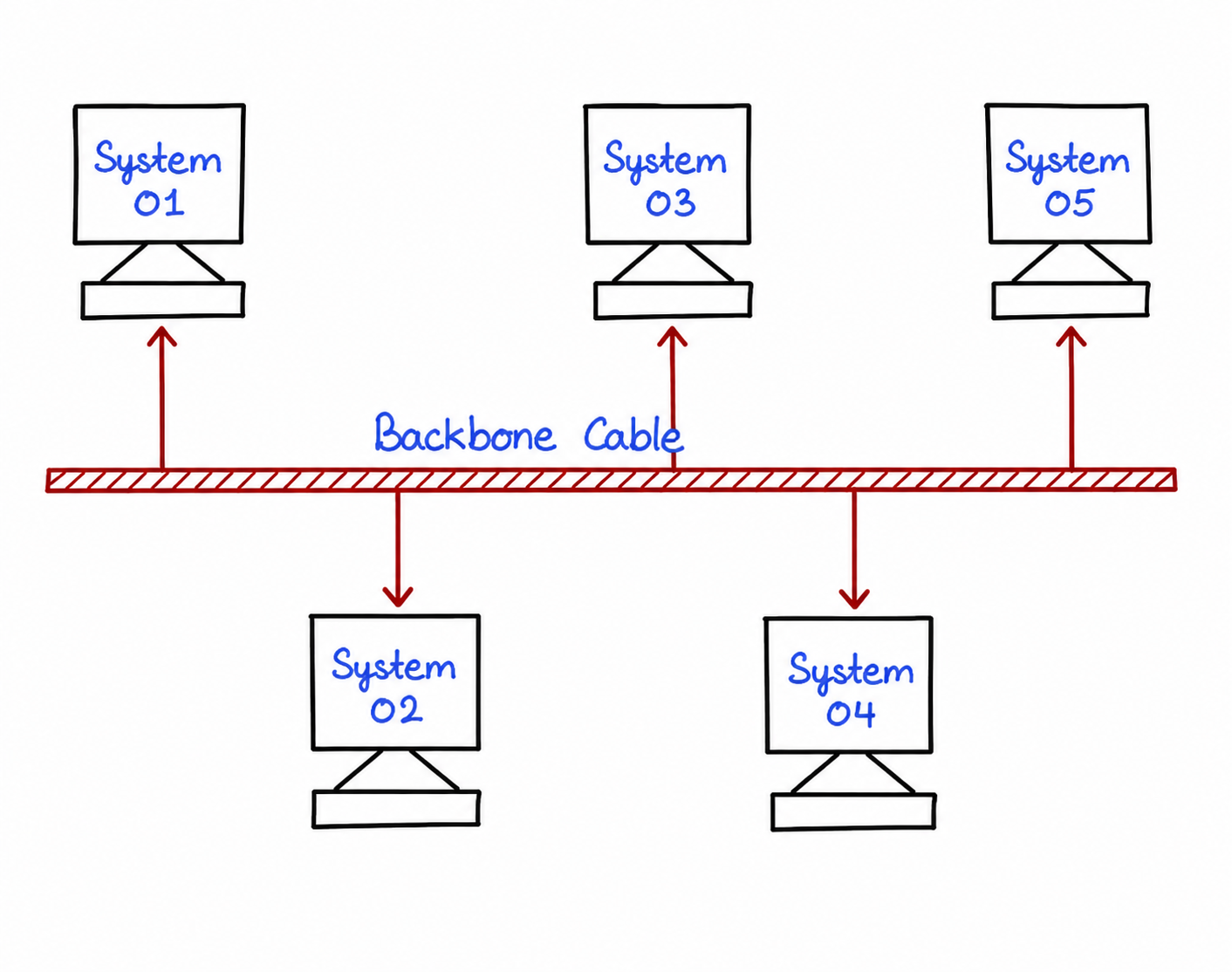
Bus topology is one of the simplest network structures where all devices are connected to a single communication cable called the backbone cable. Data sent by one device travels through the backbone and can be received by all connected devices.
This topology is cost-effective and easy to install for small networks. However, if the backbone cable fails, the entire network stops functioning.
Advantages of Bus Topology
- Bus topology is simple to design and install because all devices are connected through a single main communication cable. This makes it easy for beginners to understand and implement.
- It requires less cabling compared to many other network topologies, which helps reduce the overall setup cost of the network.
- The installation and maintenance expenses are relatively low, making it a cost-effective solution for small offices, classrooms, and temporary network setups.
- New devices can be connected to the backbone cable without making major changes to the existing network structure.
- Since fewer networking components are required, the topology can be deployed quickly and efficiently in environments with limited resources.
- Bus topology works well for small networks where the number of connected devices is limited and network traffic remains low.
Disadvantages of Bus Topology
- The entire network depends on a single backbone cable. If this main cable becomes damaged or disconnected, communication across the whole network stops immediately.
- As more computers and devices are added, network performance gradually decreases because all devices share the same transmission medium.
- Finding and diagnosing network faults can be difficult since a problem at any point on the backbone may affect multiple devices.
- Bus topology is not suitable for large organizations because it supports only a limited cable length and a limited number of connected devices.
- When multiple devices attempt to transmit data at the same time, data collisions can occur, resulting in slower communication and reduced efficiency.
- Security is comparatively weaker because data sent through the backbone cable can potentially be accessed by other connected devices on the network.
- Network expansion beyond a certain limit becomes difficult, and excessive traffic can lead to frequent performance issues.
2. Star Topology
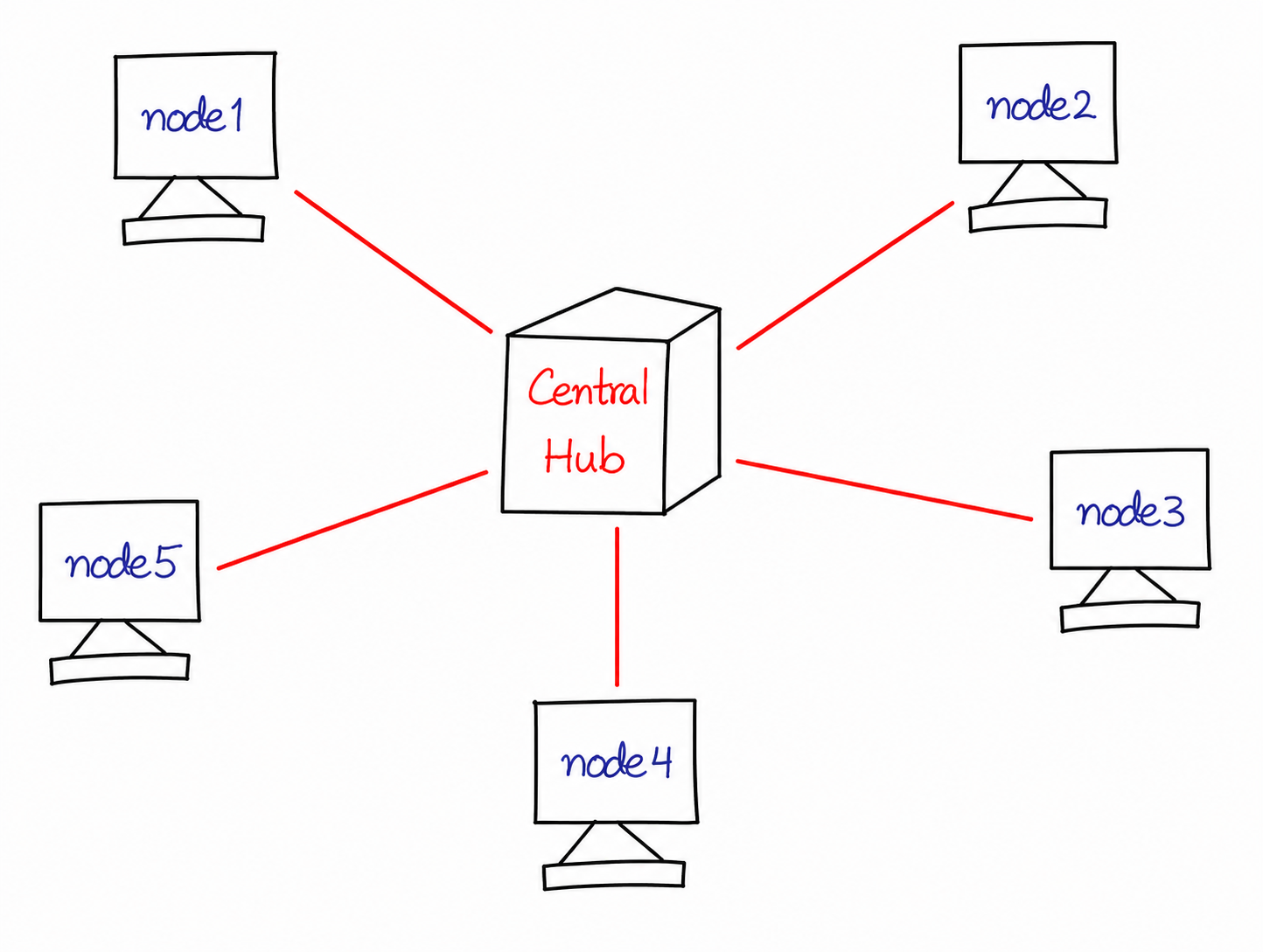
Star topology is the most commonly used network topology. In this arrangement, every device is connected to a central hub or switch. Communication between devices occurs through this central device.
Because each node has a separate connection, network management and fault detection become much easier.
Advantages of Star Topology
- Star topology is easy to install and manage because each device is connected directly to a central hub or switch. This organized structure simplifies network setup and administration.
- A failure in one computer or communication cable does not affect the operation of other connected devices. As a result, the rest of the network continues to function normally.
- Identifying and resolving network problems is straightforward because each connection is independent. Network administrators can quickly locate faulty devices or cables.
- Star topology provides good network performance since every device has a dedicated communication link with the central device, reducing the chances of data collisions.
- New computers, printers, or other devices can be added to the network without interrupting the communication of existing nodes.
- The centralized structure allows better monitoring, management, and control of network traffic, improving overall network efficiency.
- It is highly suitable for modern office networks, educational institutions, and business environments where reliability and scalability are important.
Disadvantages of Star Topology
- Star topology requires a separate cable connection for every device, resulting in higher cabling requirements compared to simpler topologies such as bus topology.
- The overall installation cost is higher because additional networking equipment such as hubs, switches, connectors, and cables are needed.
- The entire network depends heavily on the central hub or switch for communication between devices.
- If the central device fails due to hardware issues or power loss, all connected devices lose network access and communication stops completely.
- Large networks may require high-performance switches, which can significantly increase the overall network budget.
- Regular maintenance and monitoring of the central device are necessary because it acts as the backbone of the entire network.
- Although the topology is scalable, managing a very large number of connections may become complex and require additional networking hardware.
3. Ring Topology
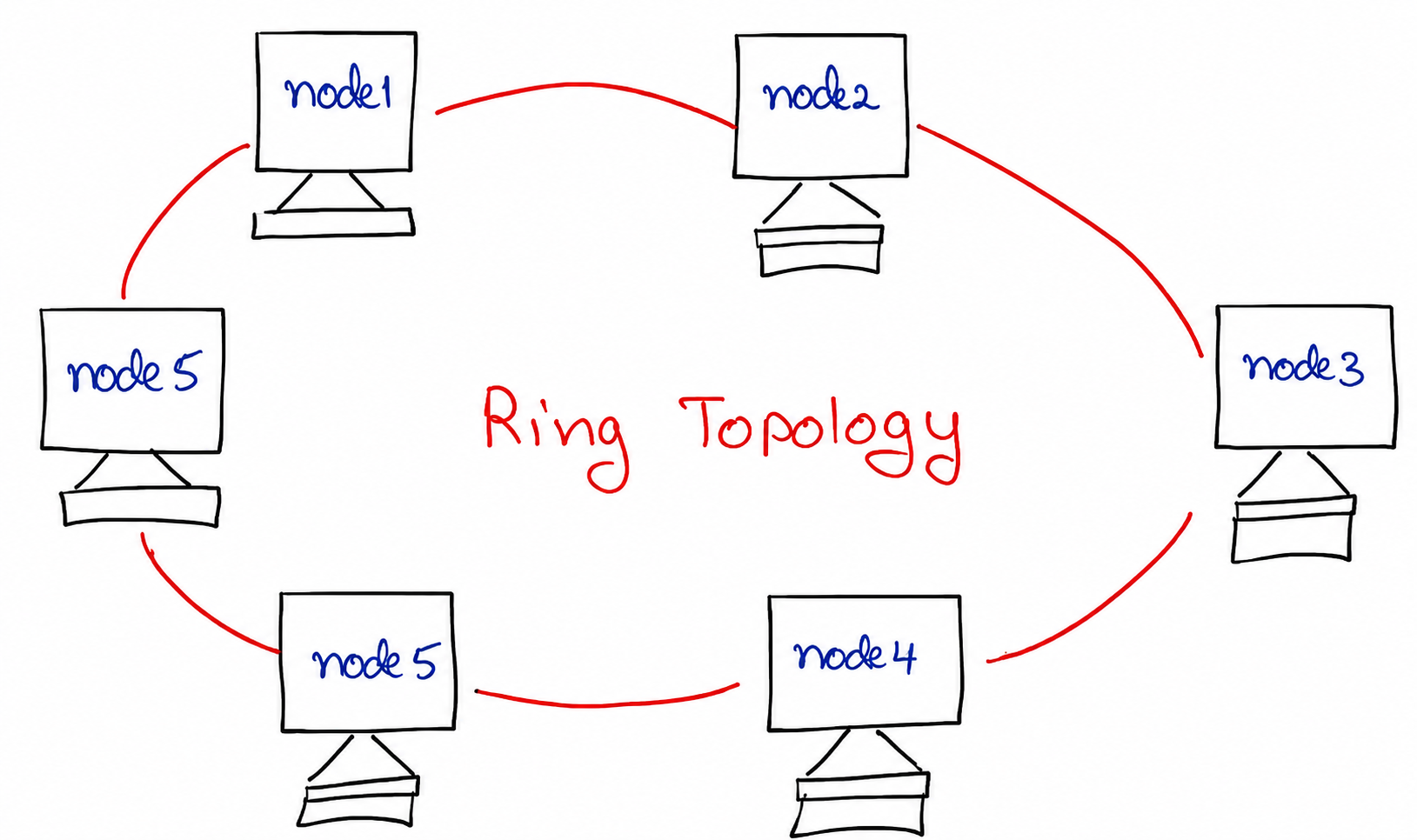
In Ring Topology, every node is connected to two neighboring nodes forming a circular path. Data travels in a predefined direction around the ring until it reaches its destination.
This organized transmission method helps reduce collisions and improves communication efficiency.
Advantages of Ring Topology
- Ring topology provides an organized method of communication because data travels in a predefined direction around the network. This controlled flow helps maintain efficient data transmission.
- Since devices transmit data one at a time through a structured path, the chances of data collisions are significantly reduced compared to some other network topologies.
- Every device in the network receives an equal opportunity to access the communication channel, ensuring fair data transmission among all connected nodes.
- Ring topology can handle moderate network traffic efficiently because data packets move systematically from one node to another without creating unnecessary congestion.
- The topology does not require a central hub or switch for communication, which reduces dependency on a single controlling device.
- Network performance remains relatively stable when the number of connected devices is within the designed capacity of the network.
- The structured communication mechanism makes ring topology suitable for applications where predictable and orderly data transfer is important.
Disadvantages of Ring Topology
- A failure in a single device, communication link, or network connection can interrupt the flow of data and affect the operation of the entire network.
- Troubleshooting network problems can be challenging because identifying the exact location of a fault within the ring may require detailed analysis.
- Adding, removing, or replacing a device often requires temporary interruption of the network, which can affect communication for all users.
- Network maintenance is generally more complex than in some other topologies because every node plays a role in forwarding data.
- Expanding the network becomes increasingly difficult as more devices are added, especially in larger environments.
- Data must pass through multiple intermediate devices before reaching its destination, which may increase transmission delays in larger rings.
- The overall reliability of the network can decrease if proper backup mechanisms are not implemented to handle failures.
4. Mesh Topology
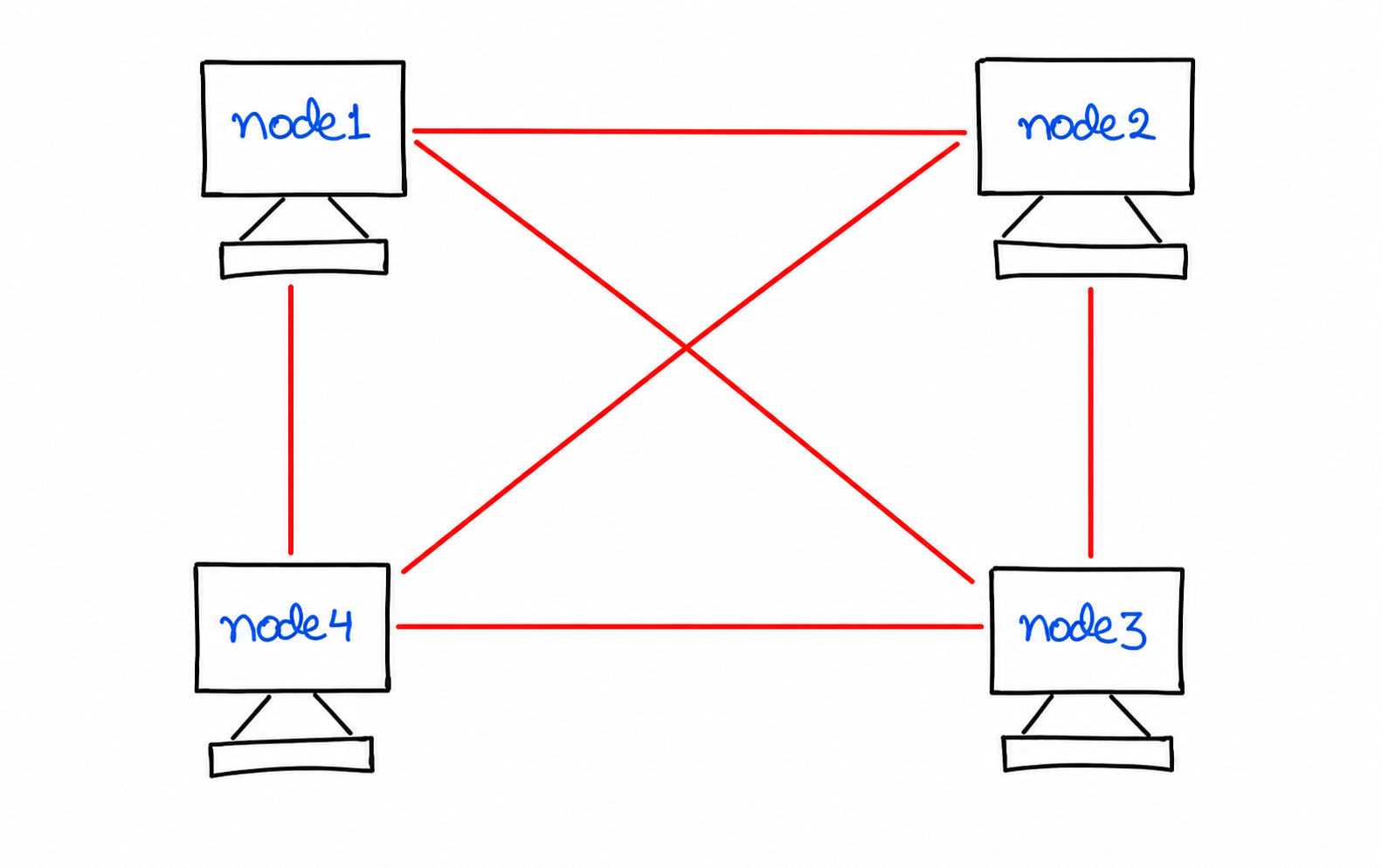
Mesh topology connects devices using multiple communication paths. In a full mesh network, every device has a dedicated connection with every other device.
This topology offers maximum reliability because alternative paths are available if one connection fails.
Advantages of Mesh Topology
- Mesh topology provides excellent reliability because multiple communication links exist between devices. If one connection fails, data can be transmitted through an alternative path without interrupting network communication.
- It offers a high level of fault tolerance since the network does not depend on a single communication channel. This makes mesh topology suitable for critical systems where continuous connectivity is essential.
- Multiple communication paths are available between devices, allowing data to travel through the most appropriate route and improving network availability.
- Security and privacy are enhanced because dedicated links can be used for communication between specific devices, reducing the risk of unauthorized access to transmitted data.
- Fault detection and isolation are relatively easier because each connection can be monitored independently, helping administrators identify network issues more quickly.
- Network traffic can be distributed across different links, reducing congestion and improving overall communication efficiency.
- Mesh topology is widely used in applications that require maximum uptime and dependable communication, such as military networks, financial institutions, and data centers.
Disadvantages of Mesh Topology
- Mesh topology is one of the most expensive network topologies because a large number of cables, connectors, and network interfaces are required to establish multiple connections.
- The installation process can be complicated and time-consuming, especially in large networks where every device must be connected to several other devices.
- A significant amount of cabling is needed, which increases infrastructure costs and may require additional physical space for cable management.
- Maintaining and managing the network can be difficult because the number of connections grows rapidly as new devices are added.
- Network design and configuration require careful planning and experienced administrators to ensure proper operation.
- The topology consumes more hardware resources compared to other network structures, making it less practical for small organizations with limited budgets.
- As the network expands, monitoring and documenting all communication links becomes increasingly complex and may increase administrative overhead.
5. Tree Topology
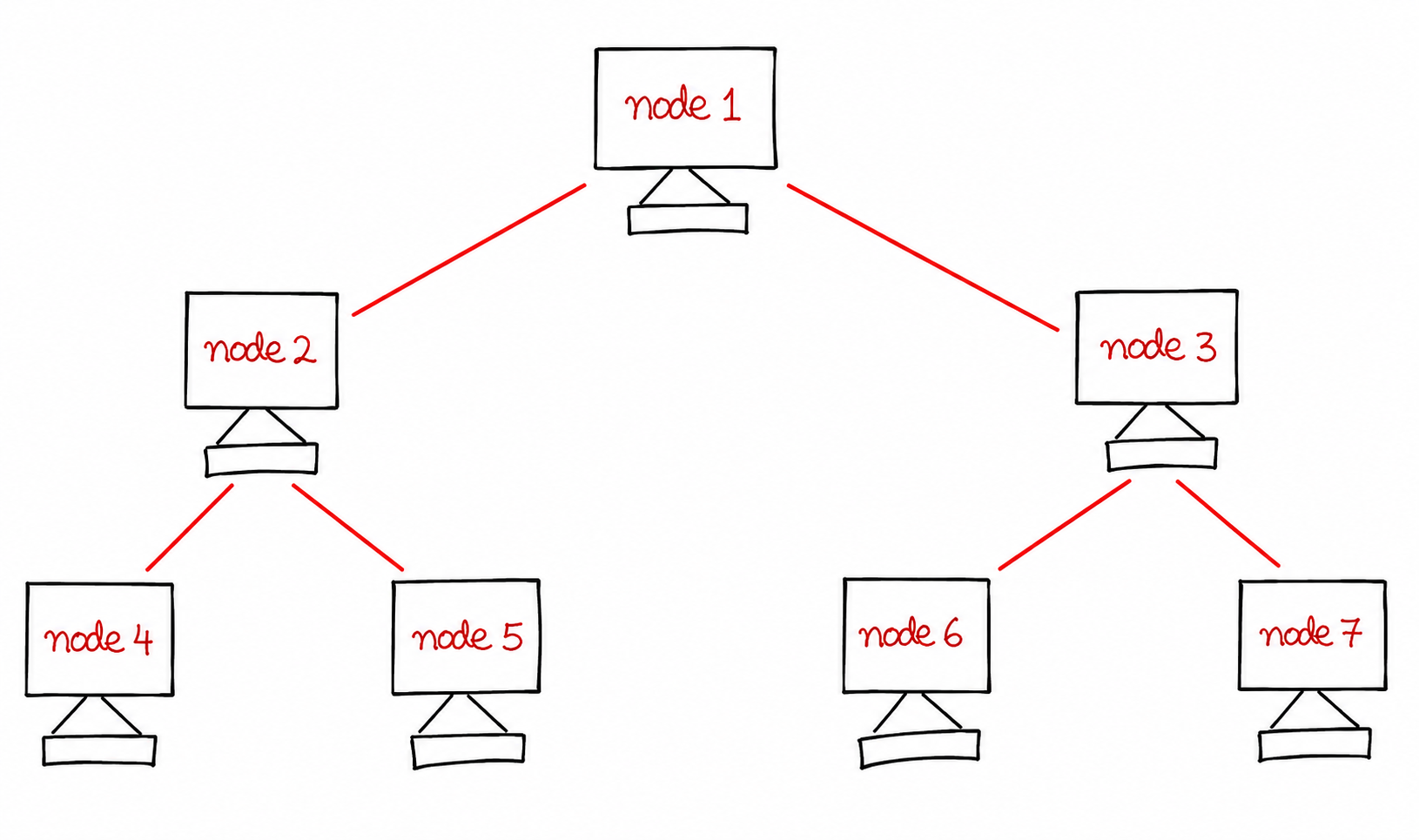
Tree topology follows a hierarchical structure. It combines the characteristics of both bus and star topology. A root node connects to several branches and sub-branches.
Large organizations commonly use tree topology because it supports structured growth and centralized management.
Advantages of Tree Topology
- Tree topology allows easy network expansion because new devices and branches can be added to the existing structure without causing major changes to the overall network.
- It is highly suitable for large organizations, universities, and enterprises where a large number of computers and network devices need to be connected in an organized manner.
- The hierarchical arrangement of nodes makes network management simpler, as different departments or sections can be controlled independently through separate branches.
- Faults can be isolated more effectively because each branch operates as an individual segment. This helps administrators identify and resolve issues more quickly.
- Tree topology offers excellent flexibility for future growth, allowing organizations to expand their networks according to changing requirements.
- The structured design improves network organization and helps maintain better control over communication between different network segments.
- Since the topology combines the benefits of both bus and star topologies, it provides a balance between scalability, performance, and efficient management.
Disadvantages of Tree Topology
- The configuration and setup process can be more complicated than simpler network topologies because multiple levels of hierarchy must be planned and implemented correctly.
- A considerable amount of cabling and networking hardware is required, increasing the overall installation and infrastructure cost.
- The initial investment is relatively high due to the need for switches, hubs, connectors, and additional communication links.
- The backbone cable serves as a critical part of the network. If it fails, communication between several branches may be interrupted or completely disconnected.
- Maintaining a large tree topology requires continuous monitoring and proper management, which can increase administrative workload.
- As the network grows, troubleshooting and diagnosing faults may become more time-consuming due to the complex hierarchical structure.
- Network performance can be affected if higher-level devices become overloaded with excessive traffic from multiple branches.
6. Hybrid Topology
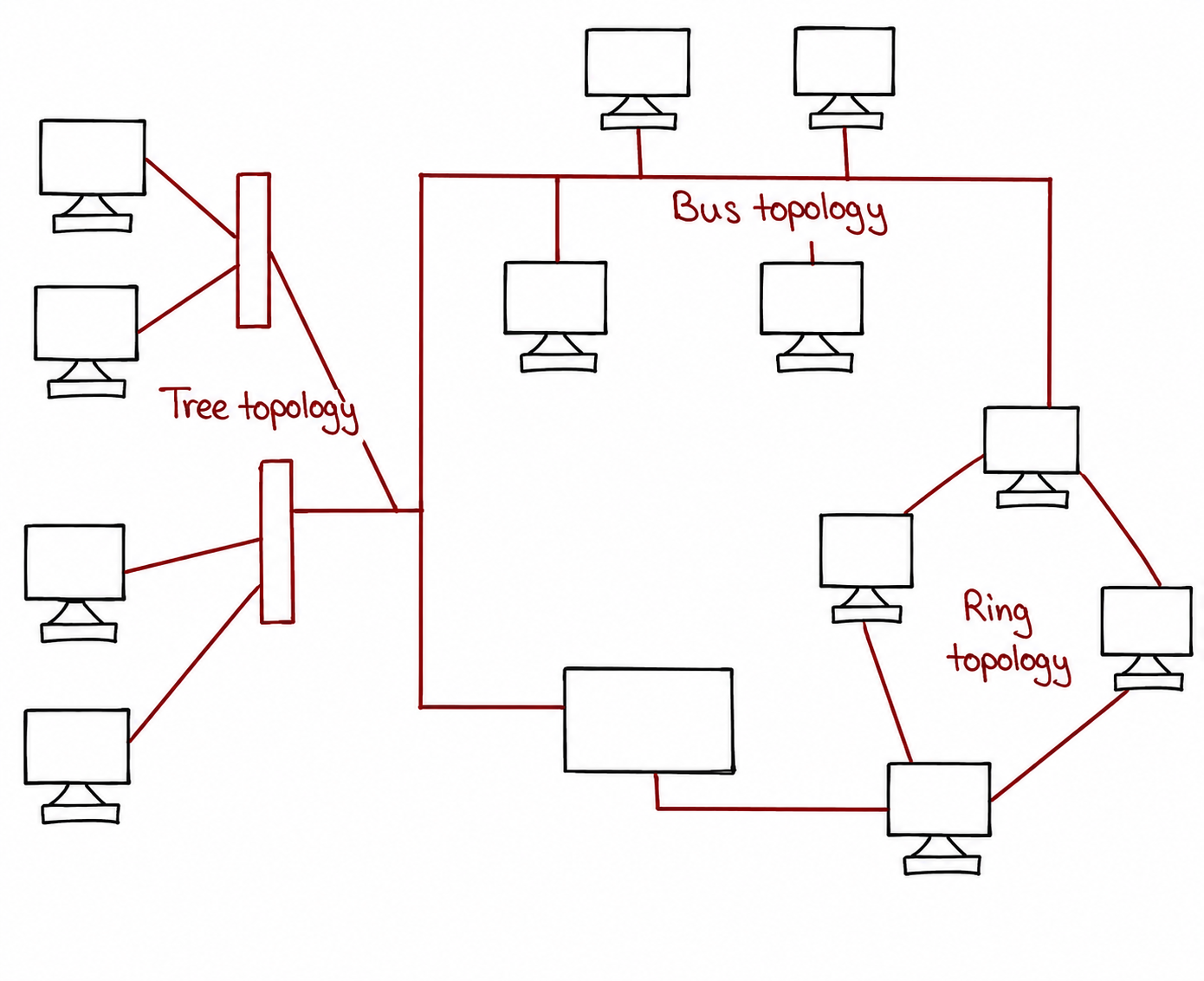
Hybrid topology combines two or more network topologies into a single network architecture. It is commonly used in enterprise environments where flexibility and scalability are important.
Organizations choose hybrid topology to benefit from the strengths of different network structures.
Advantages of Hybrid Topology
- Hybrid topology offers a high degree of flexibility because it combines the features of two or more network topologies. Organizations can design the network according to their specific communication and operational requirements.
- It provides excellent scalability, allowing businesses to expand their network infrastructure by adding new devices, departments, or network segments without significantly affecting existing operations.
- Hybrid topology ensures reliable communication since the strengths of different topologies can be combined to improve network stability and reduce the impact of failures.
- Network performance can be optimized by selecting the most suitable topology for each section of the network, resulting in efficient data transmission and resource utilization.
- It is highly suitable for large and complex organizations where different departments may have different networking needs and require customized network structures.
- The topology supports better fault isolation because problems occurring in one segment are less likely to affect other parts of the network.
- Organizations can easily adapt the network to future technological advancements and changing business requirements without redesigning the entire infrastructure.
Disadvantages of Hybrid Topology
- The implementation cost of hybrid topology is relatively high because it requires a combination of multiple networking devices, cables, switches, and other infrastructure components.
- Designing and planning a hybrid network can be complex since different topologies must be integrated properly to ensure smooth communication and compatibility.
- Troubleshooting network issues may be challenging because faults can occur across multiple interconnected topologies, making problem identification more difficult.
- The network requires experienced and skilled administrators who understand the operation and management of various network topologies.
- Maintenance efforts are generally higher due to the larger number of devices, connections, and configurations that need regular monitoring and updates.
- Network documentation and management become more complicated as the size and complexity of the hybrid network increase.
- Upgrading or modifying certain parts of the network may require careful planning to ensure that changes do not negatively affect other connected network segments.
Difference Between Network Topologies
Different network topologies have unique characteristics that make them suitable for specific networking environments. They differ in terms of structure, cost, reliability, scalability, performance, and maintenance requirements. The following table provides a detailed comparison of the major network topologies used in computer networks.
| Feature | Bus Topology | Star Topology | Ring Topology | Mesh Topology | Tree Topology | Hybrid Topology |
|---|---|---|---|---|---|---|
| Network Structure | All devices share a single backbone cable. | All devices connect to a central hub or switch. | Devices are connected in a circular path. | Devices are interconnected through multiple links. | Hierarchical arrangement of nodes and branches. | Combination of two or more topologies. |
| Installation Cost | Low | Moderate | Moderate | Very High | High | High to Very High |
| Reliability | Low because backbone failure affects the network. | High due to independent node connections. | Moderate reliability. | Very High because multiple paths are available. | High with proper network management. | Very High depending on topology combination. |
| Scalability | Limited expansion capability. | Easy to add new devices. | Moderate scalability. | Difficult in large networks. | Excellent scalability. | Highly scalable. |
| Fault Tolerance | Very Low | High | Moderate | Excellent | High | Very High |
| Performance | Performance decreases as traffic increases. | Provides good network performance. | Efficient for controlled traffic. | Excellent performance and availability. | Good performance for large networks. | Depends on the combined topologies. |
| Maintenance | Difficult fault detection. | Easy maintenance and troubleshooting. | Moderately difficult maintenance. | Complex maintenance. | Requires structured management. | Complex due to mixed architecture. |
| Cable Requirement | Least amount of cable. | More cable than bus topology. | Moderate cable requirement. | Very large amount of cabling. | High cable requirement. | Depends on network design. |
| Suitable For | Small offices and temporary networks. | Schools, offices, and business organizations. | Small to medium-sized networks. | Critical communication systems and data centers. | Large organizations and educational institutions. | Large enterprises and complex network environments. |
| Main Limitation | Single backbone failure can stop the network. | Dependence on central hub or switch. | Failure of one node may affect communication. | Very expensive implementation. | Backbone failure affects multiple branches. | Complex design and higher maintenance cost. |
From the above comparison, it is clear that each topology offers different advantages and limitations. Bus topology is economical for small networks, Star topology is widely preferred for modern networking, Ring topology provides organized communication, Mesh topology offers maximum reliability, Tree topology supports large hierarchical networks, and Hybrid topology delivers flexibility for complex organizational requirements.
Conclusion
Network topology determines how devices communicate within a network. Bus topology provides simplicity, Star topology offers easy management, Ring topology ensures organized communication, Mesh topology delivers maximum reliability, Tree topology supports hierarchical growth, and Hybrid topology combines multiple topologies for better flexibility. Understanding these topologies helps in selecting the most suitable network design based on performance, cost, scalability, and reliability requirements.