Prototyping Model in Software Engineering
The Prototyping Model is an important software development approach in which a preliminary version of the system, known as a prototype, is created before developing the final product. This model focuses on building a working model of the system quickly so that users and stakeholders can visualize how the system will function in real life.
Unlike traditional models where requirements must be finalized at the beginning, the Prototyping Model allows requirements to evolve over time. It is especially useful when users are not able to clearly define their needs in the early stages of development.
The main idea behind this model is simple: instead of waiting until the end to see the product, developers create a sample system early and improve it based on user feedback. This continuous interaction reduces misunderstandings and ensures that the final system meets user expectations.
Prototyping Model Diagram
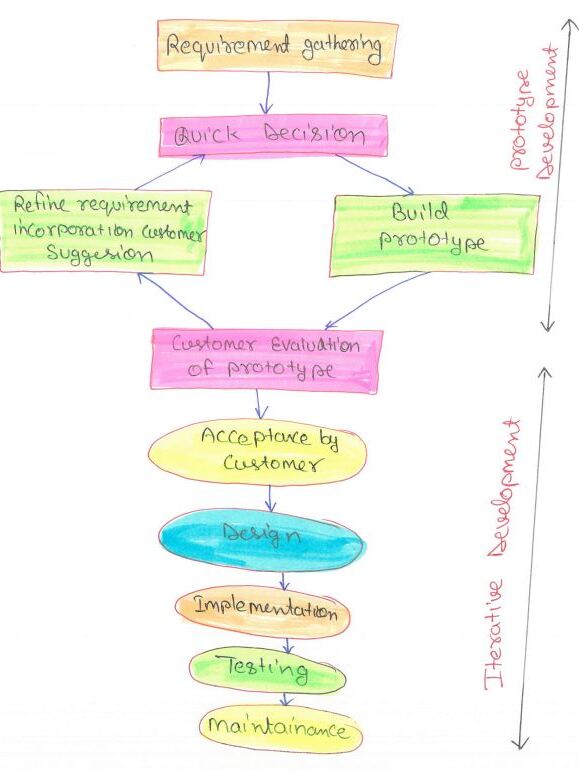
As shown in the diagram, the process involves building a prototype, gathering feedback, refining it, and repeating this cycle until the final system is ready. This iterative approach improves clarity and reduces development risks.
Phases of Prototyping Model
1. Requirement Gathering
The first phase begins with collecting basic requirements from users and stakeholders. In the Prototyping Model, requirements are not expected to be complete or fully defined. Instead, only the core objectives, major functionalities, and user expectations are identified.
This phase provides a starting point for development. Since users may not clearly know what they want, gathering even partial requirements is enough to move forward and build an initial prototype.
2. Quick Design
After gathering requirements, a quick and simple design of the system is prepared. This design mainly focuses on the user interface, system flow, and visible features. It does not include detailed technical aspects like database design or complex logic.
The goal of quick design is to create a rough blueprint that helps developers build a prototype quickly and allows users to visualize the system structure.
3. Build Prototype
Based on the quick design, a working prototype is developed. This prototype is a simplified version of the system that demonstrates important features such as screens, forms, and user interactions.
It is not a complete product but gives users a practical idea of how the final system will look and function. The prototype is developed quickly using rapid development tools.
4. Customer Evaluation of Prototype
Once the prototype is ready, it is presented to the customer or end users for evaluation. Users interact with the prototype and provide feedback regarding its usability, design, functionality, and performance.
This phase helps identify missing requirements, errors, and misunderstandings early in the development process. User feedback plays a crucial role in improving the system.
5. Refine Prototype (Iteration Cycle)
Based on customer feedback, the prototype is modified and improved. Necessary changes, suggestions, and corrections are incorporated into the system.
This process forms an iterative loop between prototype building and customer evaluation. The cycle continues until the customer is satisfied with the prototype and all major requirements are clearly understood.
6. Acceptance by Customer
After several iterations, once the prototype meets user expectations, it is finally approved by the customer. This approval indicates that requirements are now clear, validated, and ready for final development.
At this stage, the prototype acts as a reference model for building the actual system.
7. Design (Detailed System Design)
After acceptance, a detailed system design is created. Unlike the quick design phase, this stage includes complete technical specifications such as system architecture, database design, algorithms, and module structure.
This design serves as a strong foundation for the implementation phase.
8. Implementation (Coding)
In this phase, developers convert the design into actual source code using appropriate programming languages and tools. Each module of the system is developed carefully based on the approved design.
Coding standards and best practices are followed to ensure maintainability and quality.
9. Testing
After implementation, the system is tested thoroughly to ensure that it works correctly and meets all user requirements. Testing includes checking functionality, performance, security, and usability.
Since requirements were already validated during prototyping, fewer errors are expected in this phase.
10. Maintenance
Once the system is deployed, it enters the maintenance phase. In this stage, bugs are fixed, performance is improved, and updates are made according to new requirements or changes in the environment.
Maintenance ensures the long-term success, reliability, and usability of the software system.
Since most issues are resolved during prototyping, the testing phase becomes more efficient and less error-prone.
Types of Prototyping Model
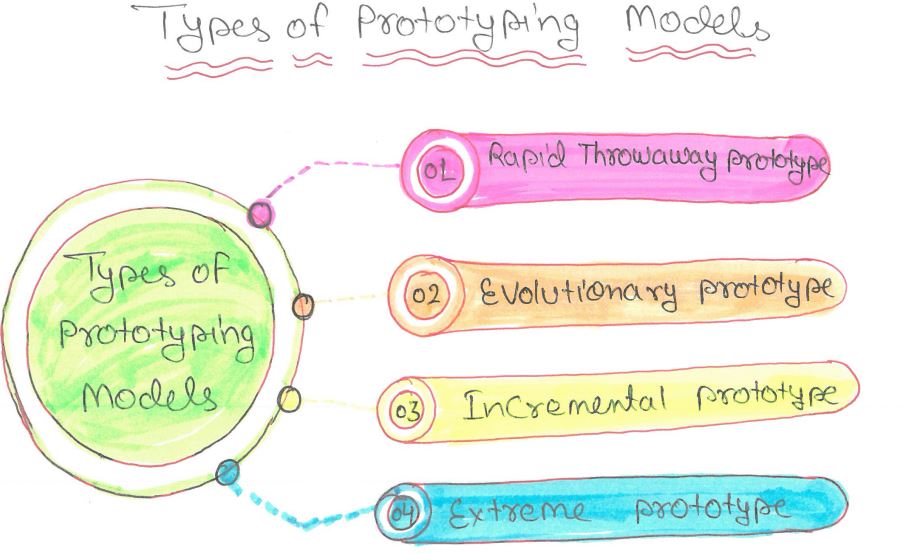
Types of Prototyping Model
1. Rapid Throwaway Prototype
As illustrated in the diagram, the Rapid Throwaway Prototype follows a step-by-step flow starting from Business Modeling and moving towards Testing & Turnover. In the first step, business requirements are roughly identified to understand the overall goal of the system.
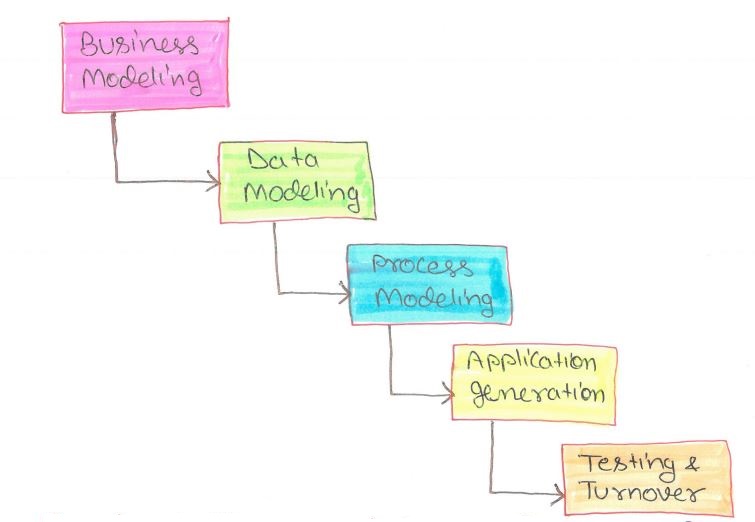
Next, Data Modeling and Process Modeling are performed to create a simple structure and flow of the system. Based on this, a quick application is generated, which acts as a temporary prototype. This version is not fully developed but provides a basic working idea of the system.
Finally, the prototype goes through Testing & Turnover, where users interact with it and give feedback. After collecting suggestions and identifying issues, this prototype is discarded. The insights gained from this process are then used to build the actual system more effectively.
This diagram clearly shows that the focus of this approach is speed and learning, not perfection, making it highly useful when requirements are not clearly defined at the beginning.
2. Evolutionary Prototype
The second type in the diagram represents the Evolutionary Prototype. In this method, the prototype is not thrown away but improved continuously over time. Each version becomes more refined based on user suggestions and feedback.
Instead of starting from scratch, developers keep modifying the same prototype until it becomes a fully functional system. This makes it suitable for projects where requirements are expected to change frequently during development.
3. Incremental Prototype
As shown in the diagram, the Incremental Prototype divides the system into smaller parts or modules. Each part is developed as an individual prototype, allowing developers to focus on one section at a time.
Once all the smaller prototypes are completed, they are combined to form the final system. This approach is useful for complex applications because it simplifies development and allows parallel work on different modules.
4. Extreme Prototype
The fourth type in the diagram is the Extreme Prototype, which is mainly used for web-based systems. It follows a staged approach to development, starting with the visual design of the user interface.
In the next stage, basic functionality is simulated without connecting to real backend services. Finally, the complete system is developed with full integration and real data processing. This method is ideal for applications where user interaction and interface design play a major role.
Overall, the diagram shows that while all these types belong to the prototyping model, each one differs in how the prototype is created, used, and transformed into the final system.
Characteristics of Prototyping Model
-
Iterative and Flexible Development Approach:
The prototyping model follows an iterative process where the system is built in small steps and continuously improved. Instead of developing the entire system at once, developers create a prototype, gather feedback, and refine it multiple times. This flexibility allows changes to be easily incorporated even at later stages of development. -
Early Involvement of Users in Development:
One of the key features of this model is active user participation from the beginning. Users interact with the prototype and provide feedback on functionality and design. This ensures that the system is developed according to real user needs rather than assumptions. -
Focus on User Interface and Interaction:
The model gives significant importance to how the system looks and behaves from the user’s perspective. Interfaces, navigation, and usability are tested early through prototypes, making the final product more user-friendly and efficient. -
Continuous Feedback and Improvement:
Feedback is collected after every iteration of the prototype. This feedback loop helps in identifying missing features, correcting errors, and enhancing system performance. As a result, the final system is more accurate and aligned with user expectations.
Advantages of Prototyping Model
-
Better Requirement Understanding:
In traditional models, users often struggle to explain their requirements clearly. With prototyping, they can interact with a working model, which makes it easier to identify what they actually need. This reduces misunderstandings and ensures that requirements are more precise and complete. -
Early Error Detection:
Since the prototype is tested at an early stage, errors and design flaws are identified quickly. Fixing issues early is much easier and less costly compared to fixing them after the system is fully developed. -
Improved User Satisfaction:
Continuous involvement of users in the development process builds confidence and trust. Users feel that their inputs are valued, and the final system closely matches their expectations, leading to higher satisfaction. -
Reduced Development Risk:
The model minimizes risks by validating requirements and design decisions early. Developers are less likely to build incorrect features, which reduces the chances of project failure. -
Faster and More Efficient Development:
Although multiple iterations are involved, the clarity gained through prototyping reduces rework in later stages. Developers have a better understanding of what to build, which speeds up the overall development process.
Limitations of Prototyping Model
-
Scope Creep:
Continuous user feedback may lead to frequent changes and addition of new features. This can expand the project beyond its original scope, making it difficult to manage time and resources effectively. -
Poor Documentation:
Since the main focus is on rapid development and iteration, proper documentation may be neglected. This can create problems in maintenance and future upgrades. -
Higher Development Cost:
Multiple iterations and repeated modifications may increase overall development cost. Time and resources are spent on refining prototypes that may not be part of the final system. -
Heavy Dependence on User Involvement:
The success of the prototyping model depends largely on user feedback. If users are not actively involved or provide unclear feedback, the development process may suffer. -
Not Suitable for Large and Complex Systems:
For large-scale systems, managing continuous iterations becomes difficult. Integrating multiple changes and maintaining consistency across modules can lead to complexity and confusion.
When to Use Prototyping Model
The Prototyping Model is best suited for projects where requirements are not clearly defined or are expected to change frequently. It is widely used in user-interface-intensive applications such as web applications, mobile apps, and interactive systems.
It is also useful when customer involvement is high and feedback is required at every stage of development.
Conclusion
The Prototyping Model provides a flexible and user-centric approach to software development. By allowing users to interact with the system early, it reduces misunderstandings and improves overall quality. Although it has some limitations, its ability to handle changing requirements makes it a valuable model in modern software engineering.